Find the right prospects however you work best - search by criteria, look up people directly, or explore companies to find decision-makers.
Start Free Trial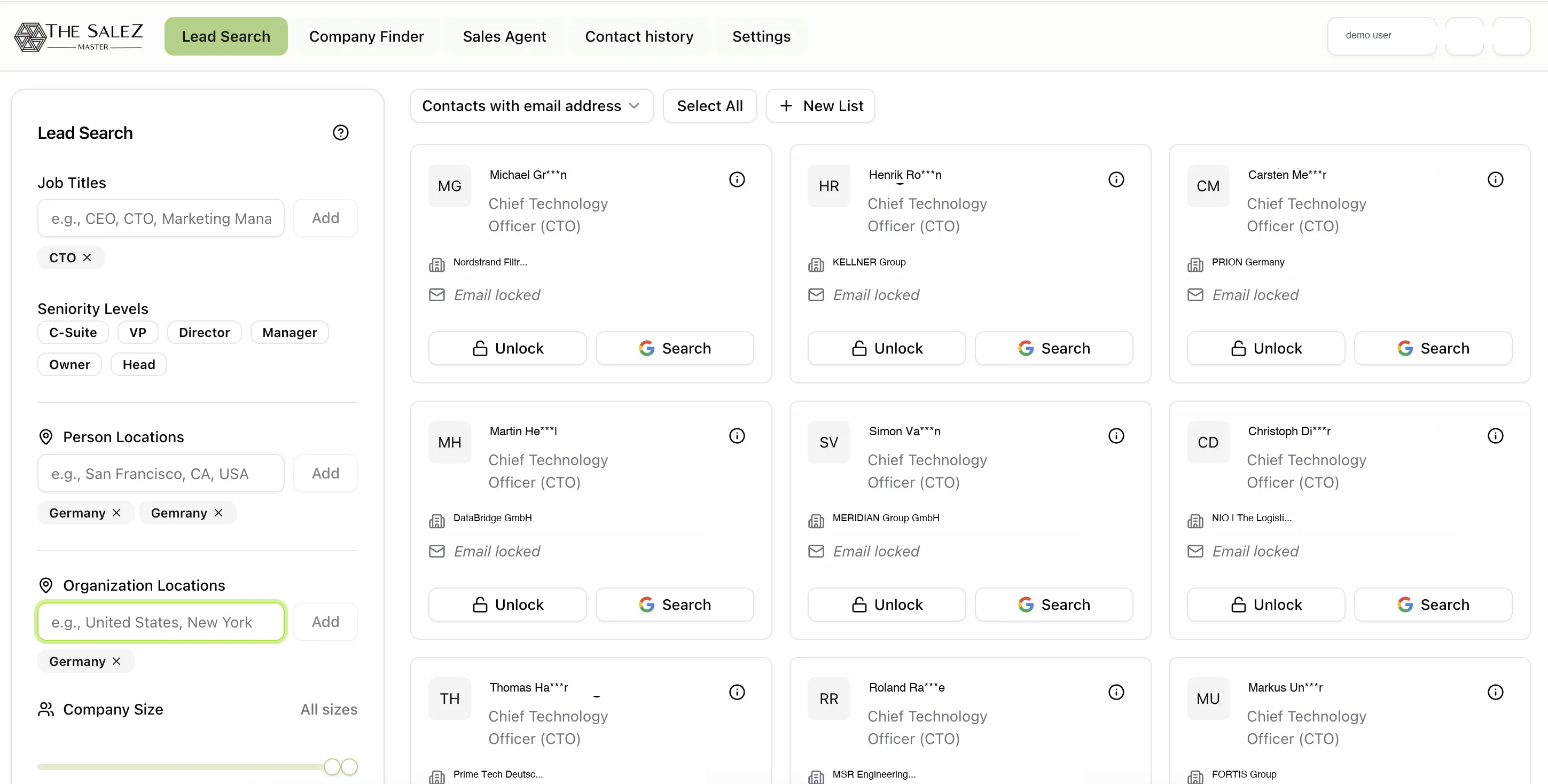
Sales teams waste hours every week manually searching LinkedIn profiles and fragmented databases trying to piece together prospect lists. Without a structured search tool, reps rely on guesswork and incomplete data - chasing leads who were never a good fit while missing the decision-makers who actually match their ideal customer profile.
The result is bloated pipelines full of low-quality contacts, slow outreach cycles, and missed revenue. Your team needs a single place to search, qualify, and export leads without jumping between tools or copying data by hand.
Define the exact profile you are looking for using criteria like job title, seniority level, geography, and company size, then let TheSaleZMaster scan its database for matching professionals. Narrow your results further by industry or department to zero in on the contacts most likely to convert. Every result comes with available contact details - email, phone, and LinkedIn - so you can move straight from search to outreach without switching tools or manually researching each person. Whether you are building a list of CTOs at mid-market SaaS companies or marketing managers in the Nordics, the filters give you precise control over who shows up in your results.
Sometimes you already know exactly who you want to reach. People Finder is built for those moments. Enter a person's full name along with their company, and TheSaleZMaster returns their professional profile with all available contact information in seconds. There are no filters to set and no lists to scroll through - just a direct lookup that gets you from name to contact details fast. Use it when a colleague mentions a prospect in a meeting, when you spot a speaker at a conference, or whenever you need a specific person's business email without digging through directories.
Take an account-based approach by starting with organizations instead of individuals. Search for companies by industry, employee count, geography, or technology stack to find businesses that match your target market. Once you have identified the right companies, drill into each organization's team to surface decision-makers and key stakeholders by department and seniority. This top-down method helps you build prospect lists that are organized by account, making it easier to coordinate outreach across buying committees and tailor your messaging to each company's context.
After you have identified the right contacts, unlock their verified business email addresses with a single click. Each unlock draws from TheSaleZMaster's enrichment layer to deliver the most current data available. When your list is ready, export everything to XLS for a clean import into your CRM or further analysis in a spreadsheet. No manual data entry, no copy-pasting between tabs - go from search to an actionable, CRM-ready contact list in minutes. Your team spends less time on data hygiene and more time on conversations that close deals.
What data sources does Lead Search use?
TheSaleZMaster aggregates professional data from publicly available business sources, company websites, and professional networks to provide up-to-date contact information for B2B outreach.
Can I filter leads by specific job titles?
Yes. You can search by job title, seniority level, department, geography, company size, and industry to find exactly the contacts that match your ideal customer profile.
What format can I export leads in?
Search results can be exported to XLS format, making it easy to import contacts into your CRM, spreadsheet, or other sales tools.
Watch how Lead Search helps sales teams build qualified prospect lists in minutes, not hours. Book a live walkthrough with our team.
Start Free Trial